Understanding Dynamic Frequency Selection (DFS) in 5 GHz Wi-Fi
Explore UniFi's DFS channels, found exclusively on the 5 GHz band, and understand their shared use with critical radar systems. Learn why these channels can cause temporary network outages and how to decide if they're right for your UniFi deployment.

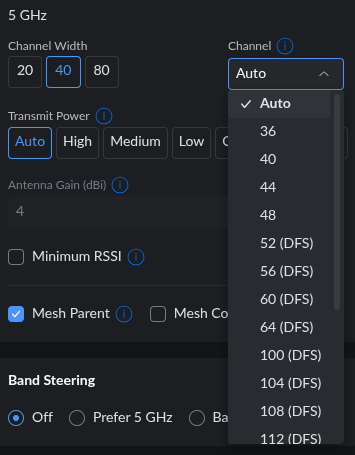
In UniFi, when configuring your 5 GHz Wi-Fi frequency, you'll notice that some channels are labeled 'DFS' while others are not. DFS stands for Dynamic Frequency Selection. In this article, we'll explore exactly what DFS channels are, why they're important, and when you should (or shouldn't) consider using them for your UniFi network.
Where Do DFS Channels Exist?
Depending on your specific UniFi Access Point model, you might have the option to transmit on three frequency bands: 2.4 GHz, 5 GHz, and 6 GHz. Our focus here will be exclusively on the 5 GHz band, as DFS channels are only found within this frequency range. You will not encounter DFS channels on the 2.4 GHz or 6 GHz bands.
The 5 GHz frequency is a license-free band, meaning it's openly available for various uses. However, it's not exclusively for Wi-Fi. It's also utilized by "primary users" such as weather radars and aviation systems.
The Advantage of 5 GHz & The DFS Implication
A significant advantage of the 5 GHz band is the availability of numerous non-overlapping channels - up to 24 in some regions. This is a substantial improvement compared to the mere three non-overlapping channels available on the 2.4 GHz band. Ideally, you want to use non-overlapping channels to minimize interference between Access Points.
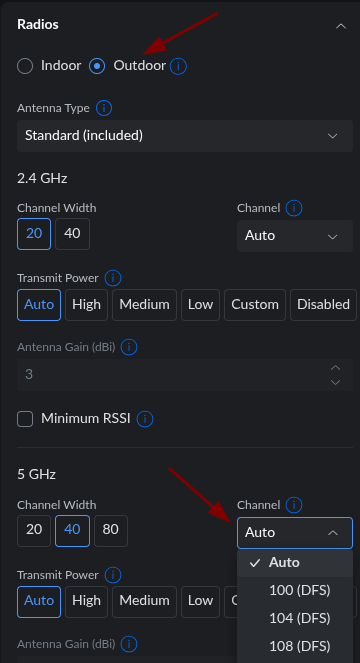
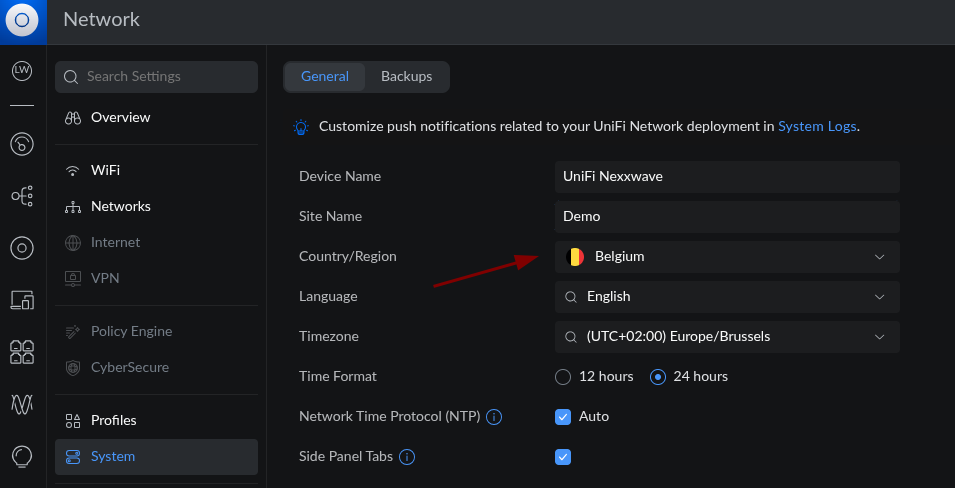
However, out of these 24 non-overlapping channels on 5 GHz, approximately 16 channels are designated as DFS channels. These are the channels shared with weather radars and aviation. You'll often observe that when you place a UniFi Access Point in 'Outdoor' mode, you might only be able to select DFS channels. Important: this is heavily dependent on the specific regulatory domain (country/region) set for your UniFi Site. Always ensure your location settings in the UniFi Controller (under Settings > UniFi Site) are accurate.
The Challenge with DFS Channels
The core issue is that "primary users" always take precedence. Regardless of your preference, this is a regulatory requirement, and UniFi equipment must comply. If weather radars are active near your UniFi Site, or if your UniFi Site is located close to an airport, their equipment will take priority over your Wi-Fi clients.
Concretely, this means that if a weather radar begins operation while your UniFi Access Point is set to a DFS channel, your Wi-Fi network might become unavailable for up to 10 minutes. This happens because the AP must detect the radar signal, immediately vacate the channel, and scan for a new clear channel to switch to.
How to Mitigate DFS Channel Interference
The only way to prevent your Wi-Fi clients from being forced off a DFS channel is to avoid using DFS channels altogether. This significantly reduces the number of available non-overlapping channels on the 5 GHz frequency. However, if your UniFi Site is near an airport or a military base, this might be the only viable solution to ensure network stability.
For 'Outdoor' Access Points, there is often no alternative - again, depending on local regulations. It's common for outdoor mode to restrict channel selection to DFS channels only. You might think, "I'll just put my outdoor Access Points in 'Indoor' mode to circumvent this." Unfortunately, as the installer/administrator of the Wi-Fi network, you are responsible for its operation and must adhere to all local regulations. Attempting to bypass these regulations can lead to legal issues and interference with critical services.